
Can you reset my executions?
In this article
In this article group
- How To Update To The Latest Stable Version In n8n Cloud
- n8n cloud trial FAQ
- How to Access and Install Verified Community Nodes in n8n Cloud
- How to add or modify execution limits on your Cloud Pro-2 monthly plan
- How to transfer ownership of your n8n instance to another e-mail
- Why didn’t I receive a Magic Link email?
- I have a feature request. Who do I talk to? How can I get this functionality added?
- How to Rename an n8n Cloud Instance
- How do I change my email?
- I want to cancel my paid subscription
- How do I delete my n8n account
- How to download workflows from a backup
- 404 page and how to download your workflows when your instance is not available after an expired trial
- How Do I Change My n8n Cloud Plan
- Can I add or reset my n8n Assistant credits?
- I am getting 503 errors on my workspace
- How can I add more workflow executions?
- Can I use my own AI API key on n8n Cloud?
- Why do I have fewer n8n Assistant credits since 1 October 2026?
- Is n8n down?
Yes. As a one-time courtesy, we can reset your current month's execution count at no charge. This applies to Trial customers (1,000 executions), Cloud Starter plan subscribers (2,500 executions), and Cloud Pro-1 plan subscribers (10,000 executions). Please note we can do this only once per customer. To request an execution reset, email help@n8n.io and we’ll take care of it if you’re eligible.
If you have a Cloud Pro-2 monthly subscription, you can self-serve on adding executions, up to a maximum of 500,000 monthly executions. Please see: How to add or modify execution limits on your Cloud Pro-2 monthly plan.
If you are a Cloud Pro-2 annual subscriber, you will need to contact help@n8n.io to have custom executions added to your account.
What happens when I reach my execution limit?
Executions at the limit are not queued. They fail immediately with an error. There is no backlog: normal execution only resumes for new attempts once your plan resets or you upgrade.
This applies the same way on Trial, Starter, Pro-1, and Pro-2: reaching the limit on any plan produces an immediate failure, not a queue.
Your workflows stay active and your triggers keep firing exactly as before: schedules, webhooks, and everything else. Each execution fails with an error telling you to upgrade your plan:
Execution limit reached. Consider upgrading your plan.
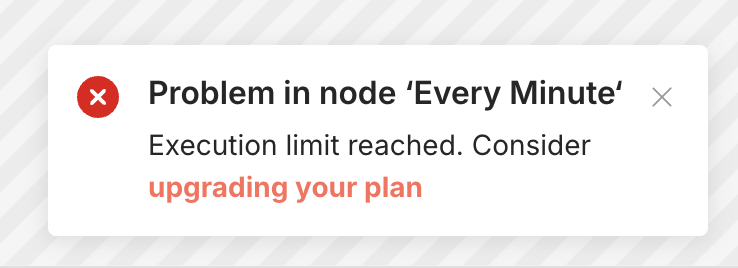
In practice, the sequence is:
Your trigger fires.
An execution is created and appears in Overview > Executions.
It fails right away with the error above, before any nodes run.
It stays in the list with a Failed status.
This continues for every execution while you are over your limit.
Are executions queued when I reach my execution limit?
No. Executions are not queued, paused, held, or retried automatically while you are over your execution limit. Each one is attempted and fails right away; there is no backlog building up in the background.
When you reset your execution count or upgrade your plan, there is no backlog to catch up on. New executions start succeeding from that point forward, but the executions that already failed stay failed and do not automatically re-run.
Which executions are affected?
Executions started by a trigger or webhook are affected, as are retries, error-handler workflows, and CLI-started executions.
If you are on a paid plan, manual executions started from the editor, chat executions, and sub-workflow executions are not affected.
Do failed executions count against my limit?
No. Failed executions do not count against your execution quota. To learn more see: Understand executions.
How do I stop my executions from failing due to the execution limit?
Wait for your monthly reset. All execution limits reset automatically at the start of each calendar month, regardless of your billing date.
Request a one-time reset. See above. This is available once per customer on Trial, Starter, and Pro-1 plans.
Upgrade your plan, or add executions on Pro-2. This takes effect immediately. Since your workflows were never paused, they'll simply start succeeding again on their next scheduled or triggered run. You don't need to do anything else to "restart" your executions.
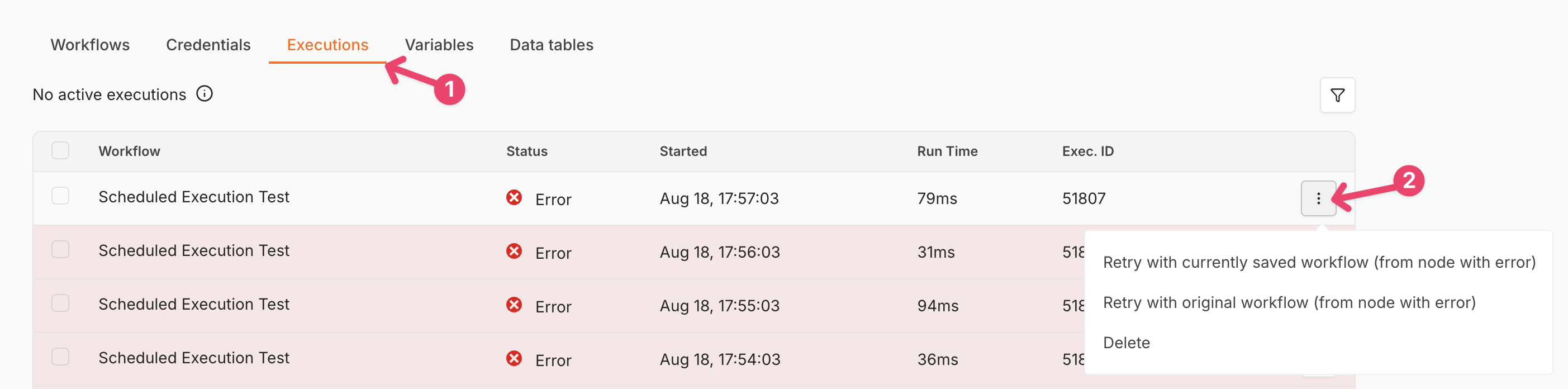
To re-run something that failed while you were over the limit, do it manually: go to Overview > Executions, click the three dots next to the failed execution, and choose the retry option you need:
Execution limit vs. concurrency limit
If you see executions sitting in a queued or waiting state, that is a different limit. Queueing applies to concurrency, not to your monthly execution quota. A concurrency-queued execution waits and then runs.
Execution limit (quota) | Concurrency limit | |
|---|---|---|
What it counts | Total executions this month | Executions running at the same time |
What happens at the limit | Execution is attempted and fails | Execution waits in a real queue |
Is there a queue? | No | Yes |
Does it run later on its own? | No | Yes, when a slot frees up |
Resets | Start of each calendar month | Continuously, as executions finish |
See: Understand concurrency.
Execution FAQ
Your n8n Cloud subscription is billed independently of your execution limit reset. All n8n cloud instances have their monthly execution limit reset at the beginning of each month, not on your bill date.
If you need more executions on an ongoing basis, it might be worth upgrading your plan. See How Do I Change My n8n Cloud Plan. If you're already on Cloud Pro-2, you can add extra executions to your existing plan. See: How to add or modify execution limits on your Cloud Pro-2 monthly plan.
Reaching your execution limit does not disable your instance or account; only individual executions that occur after the limit is hit are affected.
Article Last Updated At: 2026-10-22T13:44:24.073Z