
I want to cancel my paid subscription
In this article group
- How To Update To The Latest Stable Version In n8n Cloud
- n8n cloud trial FAQ
- How to Access and Install Verified Community Nodes in n8n Cloud
- How to add or modify execution limits on your Cloud Pro-2 monthly plan
- How to transfer ownership of your n8n instance to another e-mail
- Why didn’t I receive a Magic Link email?
- I have a feature request. Who do I talk to? How can I get this functionality added?
- How to Rename an n8n Cloud Instance
- How do I change my email?
- How do I delete my n8n account
- Can you reset my executions?
- How to download workflows from a backup
- 404 page and how to download your workflows when your instance is not available after an expired trial
- How Do I Change My n8n Cloud Plan
- Can I add or reset my n8n Assistant credits?
- I am getting 503 errors on my workspace
- How can I add more workflow executions?
- Can I use my own AI API key on n8n Cloud?
- Why do I have fewer n8n Assistant credits since 1 October 2026?
- Is n8n down?
You can cancel your subscription from the Billing page in the Cloud console. Before you cancel, download a copy of your workflows. See How to download workflows from a backup for instructions.
Note: A workflow is stored only after you save it for the first time. If it hasn’t been saved, or if you delete it within 24 hours of its first save, it may not be available in a backup.
On the Billing page, you can click on the Cancel plan button to cancel your subscription:
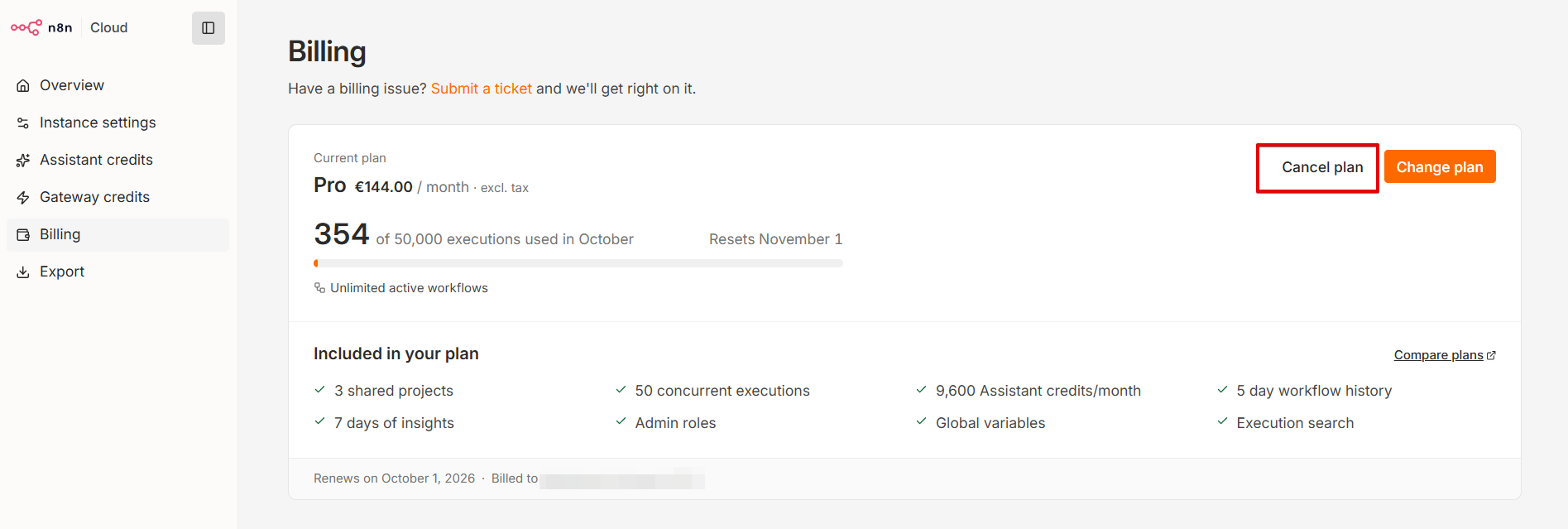
Confirm the cancellation in the prompt that appears. When it's done, the Cancel plan button is replaced by a Resubscribe button. Your subscription will be cancelled, and it will not renew on the next billing cycle.
What happens after your billing period ends
Your instance keeps working until the end of the billing period you've already paid for. Once that period ends:
- Your workflows stop running, including scheduled and webhook-triggered ones.
- Your n8n Cloud instance is stopped at the end of your billing period and deleted five days later.
- Your backups are kept for up to 90 days after your subscription ends. After 90 days, they can’t be restored. Your account data is deleted within 100 days.
If you resubscribe within 90 days after your subscription ends, your subscription will restart and your instance will be restored automatically from the latest available backup.
If your data isn’t restored, contact Support for help. Execution history isn’t included in the restore.